Project archive Feb 2018
xeometry - WebGL Library for viewing glTF
glTF, WebGL, JavaScript

An original article from the xeolabs archive. Examples and external tools reflect the time of writing.
Last month I made xeometry, a WebGL-based toolkit for viewing and navigating models loaded from glTF.
A xeometry viewer is basically a wrapper around xeogl, providing methods to:
- load models from glTF,
- reference objects by ID or type,
- show, hide and transform objects,
- visually emphasise objects, using effects like outlines and x-ray views,
- query object boundaries,
- raycast to select objects,
- move the camera around to look at target objects, and
- save and load viewer state as JSON "bookmarks".
Using object IDs
You can also just operate on objects using their IDs:
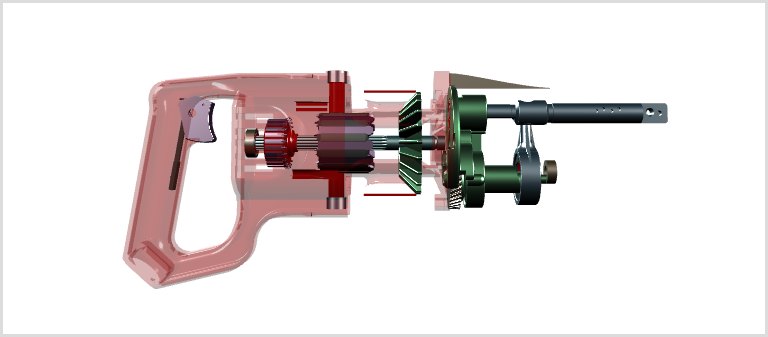
var viewer = new xeometry.Viewer({ canvasId: "theCanvas" });

 viewer.loadModel("saw", "models/Reciprocating_Saw.gltf", function () {
     viewer.setOpacity([ // Make the red plastic casing transparent
         "saw#body-node.entity.0",
         "saw#body-node_1.entity.0",
         "saw#body-node_2.entity.0",
         "saw#body-node_3.entity.0",
         "saw#body-node_11.entity.0",
         "saw#body-node_110.entity.0",
         "saw#body-node_29.entity.0",
         "saw#body-node_7.entity.0",
         "saw#body-node_6.entity.0"
     ], 0.3);
     viewer.viewFit(["saw"]);
 });
Using object types
You can tag entities within your glTF with type codes, then once you've loaded it, you're able to do operations on sets of objects that are selected by type, such as "make everything in the gearbox transparent except for the bearings and shafts".
Here's an example, using a hypothetical type system for gearbox components:
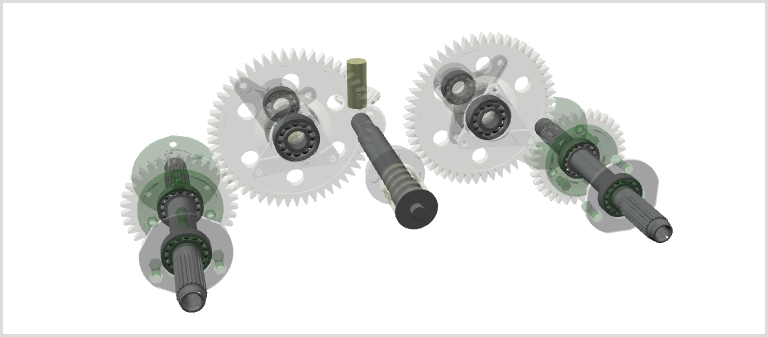
viewer.clear();

 viewer.loadModel("gearbox", "models/GearboxAssy.gltf", function () {
     viewer.setOpacity("gearbox", 0.3); // Everything in model transparent
     viewer.setOpacity(["bearing", "shaft"], 1.0); // Bearings and shafts opaque
     viewer.viewFit(["bearing", "shaft"]); // Fit 3D view to bearings and shafts
 });
Bookmarking
Once you've programmed the view you want, you can save it as a JSON bookmark.
var bearingsAndShafts = viewer.getBookmark();
 var viewer2 = new xeometry.Viewer({ canvasId: "anotherCanvas" });
 viewer2.setBookmark(bearingsAndShafts);
You can then reload that bookmark at any time to restore the view. You can also of course load the bookmark into other viewer instances, as long as they are able to load the models it references.
Here's the bookmark we just saved:
Features
- load IFC models from glTF,
- transform, show and hide objects,
- control object opacities,,
- query object boundaries,
- raycast to find objects,
- navigate camera to objects, and
- save and load JSON bookmarks.
Being able to programmatically control objects lets us code animated presentations, like exploding parts assemblies, guided tours and so on.
Architecture
The API consists of a single Viewer class, which is a facade wrapping a xeogl Scene.
The viewer API represents everything in the Scene with IDs, managing the scene objects, camera etc. internally.
For scalability, I'd normally break it up into various classes representing scene objects, camera etc, but in this case I went for a single facade in order to have a simple data-driven boundary between the xeogl graphics engine and the application layer.
The API represents everything in the viewer with IDs, managing entities internally. This results in a set of self-contained and data-driven methods that are easy to play around with in the browser's JavaScript console.
With xeogl doing all the heavy lifting, and with much of the required functionality built into xeogl by design, the facade turned out to be a very thin wrapper of around a thousand lines of code or so.
With regard to the IFC, element types are about as far as the IFC support goes for this viewer. I'm thinking that a typical BIM application layer would manage other aspects of the IFC schema, such as layers, relationships etc, while the viewer can just use object IDs and types to reference the objects in the 3D view.
